


Tattoo Studio Pro
3.713.00 Reviews
App Specs
- Version
- 4.3.16
- Updated On
- License
- Free
- Downloads
- 10,000+
- Developer
- Zadie Studio
- Categories
- Business
- Platform
- Android
Screenshots
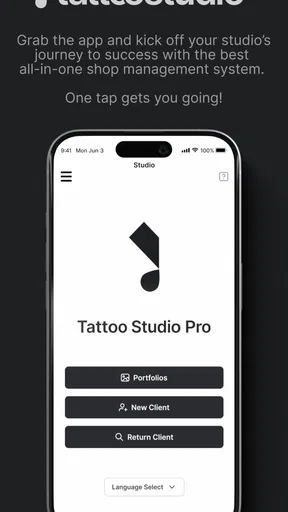
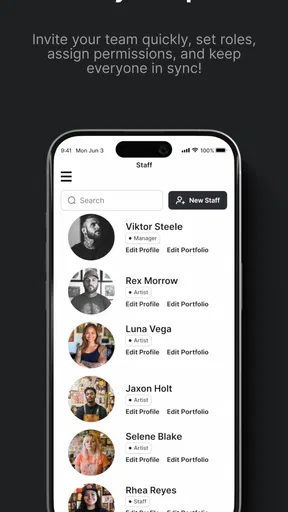
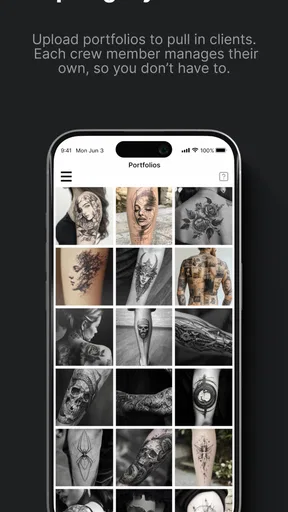
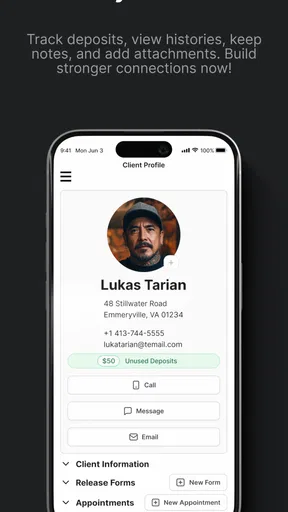
 Analysis by AppCompare
Running a tattoo or piercing studio involves much more than creating good body art. A client needs to be guided from the first enquiry to the finished appointment, while the artist, front desk, and studio owner all need a clear view of what is happening. Tattoo Studio Pro is a free business app from Zadie Studio aimed specifically at that kind of workplace. I approached it as a practical studio-management tool rather than a design app, and that distinction matters from the first minute.
My overall impression is that it makes the most sense for a small or growing studio that wants a dedicated system instead of forcing every booking, client conversation, and appointment detail into a mixture of notebooks, messaging apps, and general calendars. It is listed for Everyone and works on Android from version 8.0 onward, so the technical entry point is fairly accessible. At the same time, the app has an average rating of 3.7 from around 41 ratings, which suggests a useful but not universally smooth experience. I would treat it as a focused tool worth testing, not as an automatic replacement for every system a professional studio may already use.
From a new enquiry to a finished studio day
Before I look at how a studio might use Tattoo Studio Pro day to day, I’d start with the point where its value becomes easiest to judge: turning a fresh enquiry into a clear, workable appointment. That first handoff is where scattered messages and personal calendars tend to cause trouble, and it sets up the broader question of how a team keeps the schedule reliable.
Starting with the studio’s actual problem
The best way to understand this app is to imagine a normal working day. A potential client sends a message asking about a tattoo idea, available dates, the artist who might suit the style, and what they should bring to the appointment. In a very small studio, the response may come from the owner’s phone. Later, the booking may be written into a paper diary or a general calendar. Reference images can remain in a chat thread, while follow-up notes live somewhere else. That arrangement works until several clients, artists, and appointment changes overlap.
Tattoo Studio Pro is designed around the body-art business rather than around generic office administration. That focus is its clearest advantage. The app’s purpose is not to help me write invoices, edit images, or promote a social account. It is intended to give tattoo and piercing studios a central place for managing the business side of appointments and clients. For a studio owner, that narrower purpose can be more valuable than a much larger business suite filled with tools that never get used.
I would begin by deciding what information the studio actually needs to keep together. That sounds obvious, but it is an important preparation step. If every artist records client details differently, no app will create consistency by itself. I would agree on a naming style, a way to describe appointment changes, and a routine for checking the day’s schedule. Once those habits are in place, a dedicated system becomes easier to use and less likely to turn into another neglected screen.
The app is free to install, although in-app purchases range from $29.00 to $999.99 per item. That is a significant range, so I would not assume that every useful part of the experience is included without checking the purchase screen carefully. For a small studio, the practical question is not simply whether the download costs nothing; it is whether the required functions fit the studio’s budget and working method. A trial with one person or one appointment workflow is more sensible than committing the whole business immediately.
Worth Reading Before You Choose

EA SPORTS FC Mobile 26 Is a Bigger Football Game, but It Takes Time

Flipboard Shows What News Apps Must Do Beyond the Feed

Switching to Android Auto Means Rethinking Your Driving Routine

Google Calendar Makes a Crowded Week Easier to Manage

Ludo King Makes the Most of the Minutes Between Plans

Baby Panda World Brings Quick Play to Modern Phones, but Its Game Library Feels Busy
Building the appointment flow step by step
Once a request arrives, the first useful discipline is to turn an informal conversation into a clear appointment record. I would capture the client’s name, the kind of service requested, the preferred artist, and the agreed time in one place rather than leaving those details scattered across several conversations. For piercing work, the distinction between the requested service and the scheduled visit is especially important because a short appointment can still require careful preparation and a clear handoff.
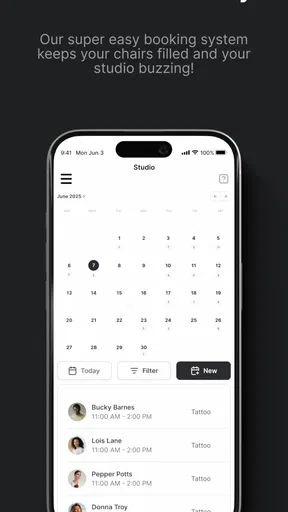
The next step is reviewing the day as a complete schedule instead of looking at each booking in isolation. A studio may have one artist preparing a large piece, another handling shorter appointments, and a piercing booking arriving between them. The value of a management system is not just recording that each appointment exists. It is helping the person coordinating the studio notice clashes, gaps, and changes before the client is standing at the reception desk.
My practical tip would be to review the schedule at two different moments: once before the studio opens and again after the last meaningful change to the day. The first check establishes the plan. The second catches the reality of cancellations, rescheduling, late arrivals, and artist availability. A system such as this is most useful when it becomes part of that routine, not when it is opened only after a problem appears.
For a client returning for another session, a consistent record can also reduce repeated questions. The studio can approach the next booking with more context instead of treating the person as a completely new enquiry. That is a subtle benefit: the app’s value grows as the studio uses the same process repeatedly. If staff members enter incomplete or inconsistent information, however, the record becomes less helpful and may create a false sense of organization.
Making handoffs less fragile
The hardest part of a studio workflow is often the handoff between people. A receptionist may speak with the client, an artist may assess the request, and the owner may need to resolve a scheduling or payment question. When those conversations happen in separate channels, small omissions become expensive. A time may be changed without everyone seeing it, or an artist may arrive without the context needed to prepare.
I see Tattoo Studio Pro as most useful at this point in the process. A shared business record gives the team a common reference instead of relying on memory. The person receiving the enquiry can pass the appointment onward in a more structured way, while the artist can focus on the creative and practical work rather than reconstructing the entire conversation. That does not remove the need for communication, but it can make communication more precise.
There is a trade-off here. Centralizing information only helps if the team trusts the record and updates it promptly. If one person keeps using private notes or personal messages, the studio ends up with two versions of the truth. I would make one staff member responsible for checking changes during the day, even in a small team. That is not a glamorous feature, but it is the difference between an organized workflow and a digital notebook that everyone edits differently.
Another useful habit is separating confirmed details from open questions in the studio’s internal process. A client may have an idea but no final placement, or may ask about a piercing without selecting a time. Treating every enquiry as a confirmed appointment creates confusion. Treating every conversation as temporary can cause the studio to lose promising leads. The app cannot make that judgement for the team, so the workflow around it should define when an enquiry becomes a real booking.
What the result looks like for different users
For a studio owner, the main result is visibility. Instead of asking several people what is happening, the owner can work from one management process and identify where attention is needed. That is particularly useful when the owner also tattoos or pierces, because the administrative workload competes directly with appointment time. A focused app can reduce the mental load of remembering every detail, even if it does not eliminate the work itself.
For an artist, the benefit is a cleaner handoff. The artist should not have to search through a long chat history to understand who is arriving and why. The more predictable the information is, the easier it becomes to prepare for the appointment and keep the day moving. This is also where a dedicated body-art workflow has an advantage over a normal calendar: a calendar can show when someone is expected, but it is not built around the studio’s client-management problem.
For a client, the improvement is less visible but still important. A professional experience depends on the studio remembering the agreed time, responding consistently, and avoiding avoidable confusion at arrival. The app does not create artistic quality, and it does not replace a thoughtful consultation. It can, however, support the administrative reliability that makes the client feel that the studio is taking the appointment seriously.
For a solo artist, the answer is more complicated. If I work alone and handle only a few appointments, a general calendar and a simple notes system may be faster. The dedicated approach becomes more attractive when I have repeat clients, several service types, or enough enquiries that personal memory is no longer dependable. In other words, the app’s usefulness is tied less to the size of the phone screen than to the complexity of the studio’s daily handoffs.
Where the workflow begins to break
The first point of friction is the purchase structure. The app is presented as free, but the available in-app purchase range is broad enough that a studio should examine the cost of the specific functions it needs. A large studio may consider the expense differently from an independent artist, but either user should identify the long-term cost before moving important business routines into the platform. Free installation is helpful for evaluation; it is not the same as free operation.
The second issue is expectation. Because the app is specialized, I would not choose it expecting a complete replacement for every business tool. A studio may still need separate solutions for accounting, marketing, image preparation, staff communication, or detailed client-consent procedures. The app’s strongest case is as a management layer for the studio’s core workflow. If the business needs a broad all-in-one platform, a general booking or salon-management service may offer a wider range of connected functions.
The rating of 3.7 from around 41 ratings also encourages a measured approach. That is enough feedback to show that the app has attracted real users, but not enough for me to treat the public response as a definitive verdict for every studio. I would pay attention to how it behaves with the studio’s own busiest workflow: multiple staff members, changed appointments, returning clients, and the transition from enquiry to completed visit. A tool can feel excellent for a solo operator and awkward for a team, or the reverse.
There is also a human limitation that no feature can solve. If staff do not update records at the moment a change is agreed, the app will not know that the change happened. For that reason, I would set a simple rule: the person who confirms a booking or alteration records it immediately. Delaying the update until the end of the day is risky because the next handoff may happen before then. This small operational rule is one of the most important ways to get value from the app.
Studios should also think carefully about access to their working information. A management app becomes part of the business routine, so the team should decide who is responsible for entries and who checks the schedule. I would avoid giving every staff member an undefined role in the process. Clear responsibility makes mistakes easier to spot and prevents the app from becoming a place where everyone assumes someone else has updated the appointment.
How it compares with familiar alternatives
The usual alternative for a small tattoo studio is a combination of a phone calendar, paper notes, messaging, and spreadsheets. That combination can be flexible and inexpensive, and a solo artist may prefer it because there is almost no setup. Its weakness appears when information needs to move between people. A dedicated studio-management app has a stronger chance of keeping the business process together, but it may require more discipline and may cost more once paid functions are involved.
A general appointment-booking service can be better for a business that needs broad scheduling, customer notifications, or connections to other office tasks. Its advantage is often breadth. Tattoo Studio Pro’s advantage is relevance: it is aimed at tattoo and piercing studios rather than adapting a generic appointment model to body art. I would choose the specialist option when the studio’s main pain is managing its own workflow, and the broader service when integrations and general business administration matter more.
A spreadsheet remains useful for owners who want full control over layout and reporting. It can be shaped around artists, services, and appointment status, but it depends heavily on manual upkeep. It is also easy to create confusing versions when several people edit or copy files. The app is a better fit when the owner wants a purpose-built experience and is willing to follow its structure. The spreadsheet is better when unusual custom fields and independent reporting are more important than convenience.
Who should use it and who should skip it
I would recommend giving Tattoo Studio Pro a serious look if you run a tattoo or piercing studio where appointments pass between an owner, artists, and front-desk staff. It is also worth considering if your current process is spread across messages, paper, and a calendar, and you are losing time reconstructing client details. The specialist focus is meaningful for a body-art business, especially when the main goal is to make the path from enquiry to appointment more orderly.
I would be more cautious if you are a solo artist with a very light schedule, already have a reliable booking system, or need a complete accounting and marketing platform. In those cases, adding another system may create more administration rather than less. I would also hesitate if the purchase options do not match the studio’s budget or if the team is unwilling to adopt one shared process. A dedicated app cannot compensate for unclear ownership of bookings.
The current version is 4.3.16, and the app was released on February 7, 2020. Those details make it reasonable to view the product as an established app rather than a brand-new experiment, but they do not answer the practical question of whether it fits a particular studio. I would install it on a compatible Android device, walk through a complete appointment cycle, and involve the person who normally handles enquiries. That test will reveal more than browsing isolated screens.
My final take after following the workflow
Tattoo Studio Pro succeeds when the problem is specifically the coordination of a tattoo or piercing business. Its strongest contribution is not a flashy extra; it is the attempt to give the studio a shared path from an initial request to a scheduled service and a completed visit. That focus can make handoffs clearer and reduce the number of places where important details are stored.
My recommendation is conditional but positive. I would suggest it to a small studio that has outgrown informal organization and is prepared to create clear habits around updating appointments. I would not recommend adopting it blindly as the only business tool, especially with in-app purchases reaching $999.99 per item. Test the workflow, confirm the cost of the functions you need, and judge it by how well it handles a busy day rather than a quiet demonstration.
With an average rating of 3.7 and over 10K installs, the app has enough presence to be worth investigating, while its modest public feedback means I would keep expectations realistic. In my view, it is best understood as a focused operational assistant for body-art studios: potentially valuable when several people need the same appointment information, less compelling when a simple personal calendar already does the job. If that starting condition matches your studio, the free download gives you a practical way to explore the fit before changing the entire business routine.
Pros
- Wide range of tattoo styles and design templates
- Useful tools for experimenting with colors and placement
- Simple interface suitable for beginners
- Helps organize ideas before visiting a tattoo artist
- Works well for quick design previews
Cons
- Some advanced features may require in-app purchases
- Digital previews may not reflect real skin results
- Design options can feel limited for experienced artists
- Requires a compatible device for smooth performance
- Not a substitute for professional tattoo advice
FAQs for Tattoo Studio Pro
What is Tattoo Studio Pro and what can I do with it?
Tattoo Studio Pro is a mobile design app intended for creating, testing, and visualizing tattoo ideas before committing to permanent ink. You can usually combine artwork, text, colors, and placement concepts, then adjust the design to suit your preferred style. It is useful for brainstorming and sharing references with a tattoo artist, although it should not replace professional advice about skin, sizing, or safe application.
Is Tattoo Studio Pro suitable for beginners without design experience?
Yes, Tattoo Studio Pro is generally approachable for beginners because its editing tools are designed to let users experiment without advanced graphic-design knowledge. You can start with existing templates or artwork and gradually modify elements such as size, position, and appearance. However, learning where each tool is located may take a little practice, especially when creating a detailed composition from scratch.
Can I preview a tattoo on my body using Tattoo Studio Pro?
The app is primarily useful for planning and visualizing tattoo concepts, and supported preview features may allow artwork to be positioned over a photo or body area. The result should be treated as an approximation rather than an exact prediction of how the finished tattoo will look. Skin texture, body movement, lighting, ink behavior, and the artist’s technique can all change the final appearance.
Does Tattoo Studio Pro include free content, or does it require payment?
Tattoo Studio Pro may offer a combination of free tools and content alongside optional premium features, depending on the version and platform. Some designs, editing functions, or export options can be restricted behind in-app purchases or a subscription. Before downloading, check the current store listing for pricing, trial terms, recurring charges, and whether the advertised features are available without upgrading.
Can I use designs created in Tattoo Studio Pro with a professional tattoo artist?
Yes, designs made in Tattoo Studio Pro can be helpful as visual references during a consultation. You can show the artist your preferred concept, placement, style, and general proportions, but the design may need professional adjustments before it is tattooed. A qualified artist can improve line weight, sizing, readability, and suitability for your skin and body area while also checking that the final concept is original and practical.


